All stories · Article
Google will require 500×500px product images by 2027
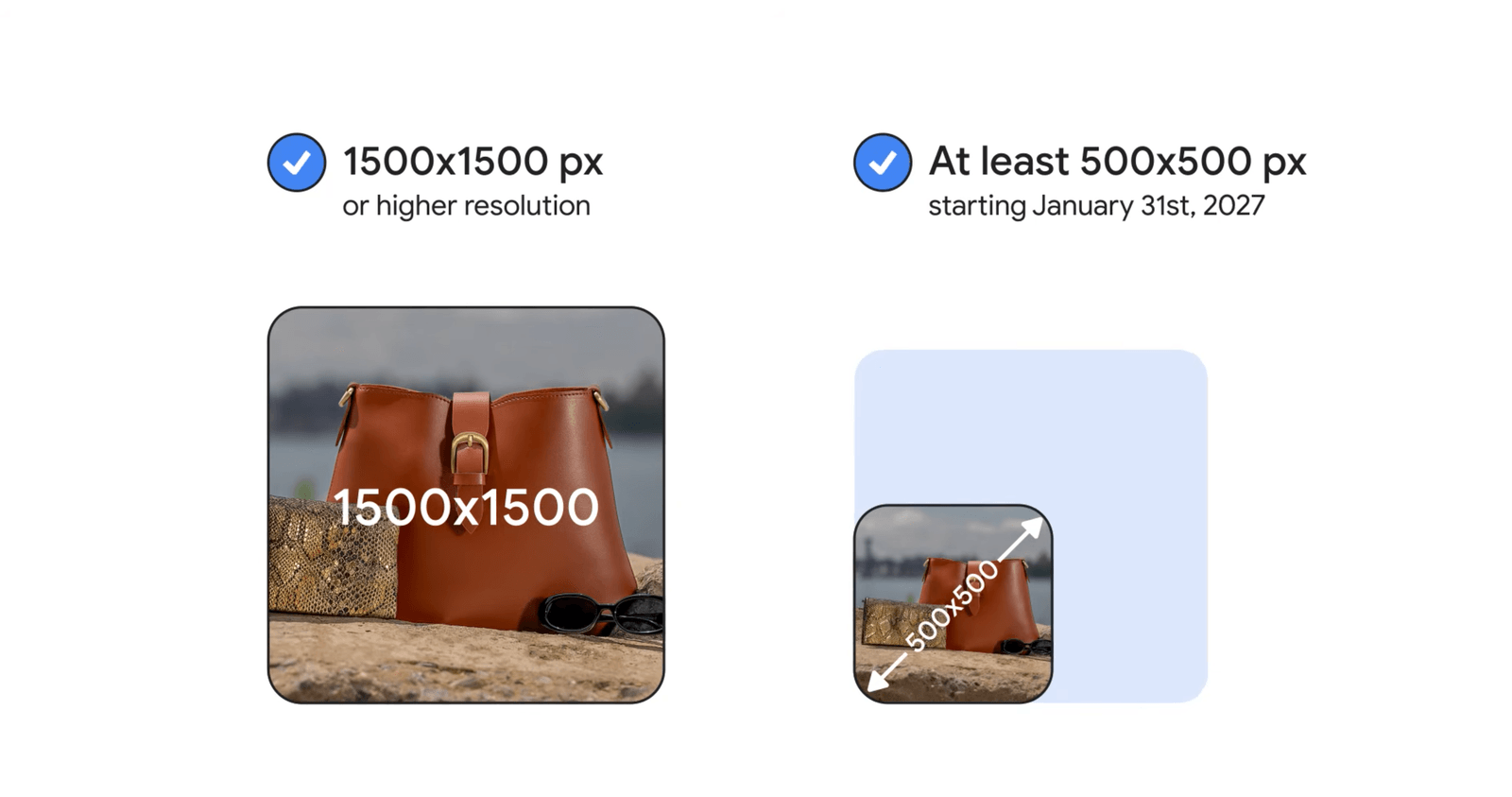
January 31, 2027 is the deadline. From that date, Google Merchant Center will enforce a minimum image resolution of 500×500 pixels across all product categories. The requirement applies to both primary and additional product images.
Share: WhatsApp · Telegram · X · Facebook · LinkedIn · Email

For Shopify stores with hundreds or thousands of listings, the challenge is not simply finding undersized images. It is identifying which products are at risk, locating higher-resolution originals and replacing the right images before enforcement begins.
The good news: sellers do not need to start by manually checking every image in their media library. The first step is to identify which products are actually at risk of disapproval.
Thousands of undersized images do not necessarily mean thousands of disapproved products
Until the new deadline, Google allows minimum image sizes of 100×100 pixels for most products and 250×250 pixels for apparel. Images that meet those older thresholds can still fall short of the upcoming 500×500 requirement.
This creates a problem for stores using supplier-provided thumbnails, older product photography or images uploaded years ago.
But there is an important distinction between primary and additional images:
- Primary image (
image_link): This is the main image representing the product across Google surfaces. If it falls below 500×500 pixels after enforcement begins, the product risks disapproval. - Additional images (
additional_image_link): These show alternative angles, product details or usage scenarios. They are also subject to the new minimum size. However, Google states that undersized additional images will not cause the product itself to be disapproved. Those images simply will not be displayed.
This changes how sellers should prioritize the work. The primary image determines whether a product can remain eligible, while additional images affect how much visual information shoppers can see.
Sources: Google: Primary image requirements · Google: Additional image requirements.
The primary image is where sellers should start
Google uses image_link for the primary product image and additional_image_link for supplementary images.
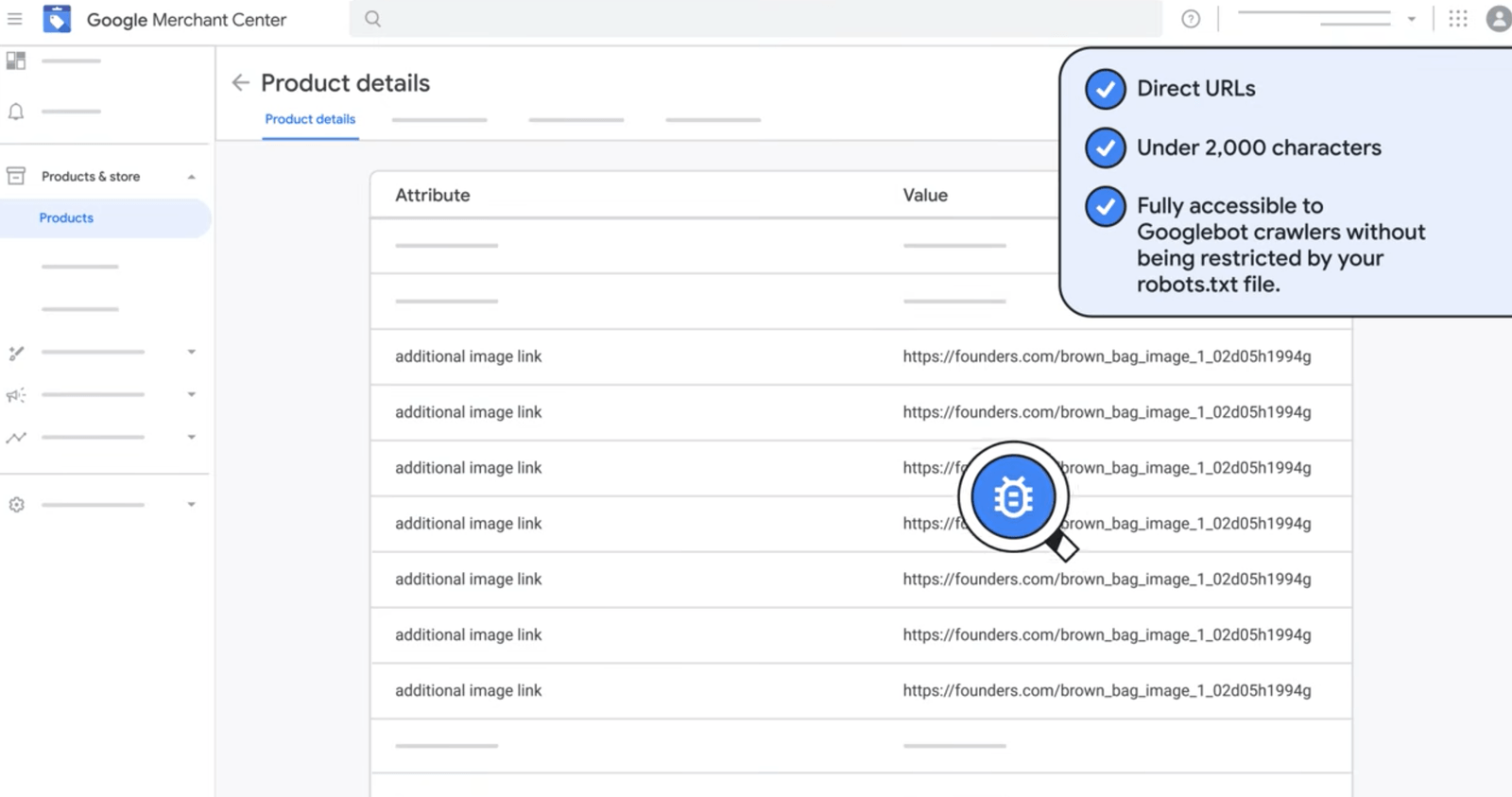
For Shopify sellers connected through the Google & YouTube channel, product images are synchronized from Shopify to Merchant Center. The main product image should therefore be the first priority when reviewing the catalog.
A practical way to organize the work:
| Image status | What sellers should do |
|---|---|
| Primary image below 500×500px | Prioritize replacement. The product is at risk of disapproval. |
| Primary image meets 500×500px, additional images do not | Keep the product eligible, but replace undersized additional images to restore their visibility. |
| All submitted images meet 500×500px | No resolution-related replacement is needed. |
This distinction matters when a catalog contains thousands of image files. The number of affected files is not necessarily the number of products that will lose eligibility on Google.
Shopify confirms that its Google & YouTube channel synchronizes product information and images with Merchant Center. Shopify documentation.
Three shortcuts that will not reliably solve the problem
1. Enlarging a small image
Turning a 250×250px image into a 500×500px file does not restore the missing visual detail. Google explicitly advises merchants to avoid scaling images up or submitting thumbnails.
Find the original high-resolution file instead. If it no longer exists, arrange a new product shoot.
2. Adding white space around the product
A larger canvas does not automatically mean a better product image.
Google recommends that the product occupy 75% to 90% of the full image. Adding large blank margins can make the actual product appear too small, even when the image dimensions technically meet the requirement.
3. Assuming Google will optimize every image
Google says it will optimize some images below 500×500 pixels where possible. These optimized images can meet the new requirements and prevent product disapproval without requiring action from the seller.
However, this applies only to some images. Google does not guarantee that every undersized image will be processed this way.
Treat automatic optimization as a potential safety net, not a replacement for checking the catalog.
Sources: Google: Image too small · Google: Merchant Center product data specification update.
Does failing the image requirement mean leaving Google Shopping?
For Shopify sellers who depend on Google Shopping for traffic and sales, abandoning the entire channel would be an unnecessarily broad response.
The new requirement affects products with non-compliant primary images. Disconnecting Merchant Center would also remove products that already meet the requirements from that sales channel.
There are two situations where the impact may be less significant:
- Your store does not use Merchant Center or submit products to Google Shopping.
- Certain products no longer justify the effort required to maintain their presence on Google, so you deliberately remove them from the channel.
For everyone else, fixing the affected products is a more targeted response than giving up an entire acquisition channel.
Four steps to reduce the workload before January 31, 2027
Step 1. Download Google's affected-product list.
Open Merchant Center and go to Products → Needs attention → View history.
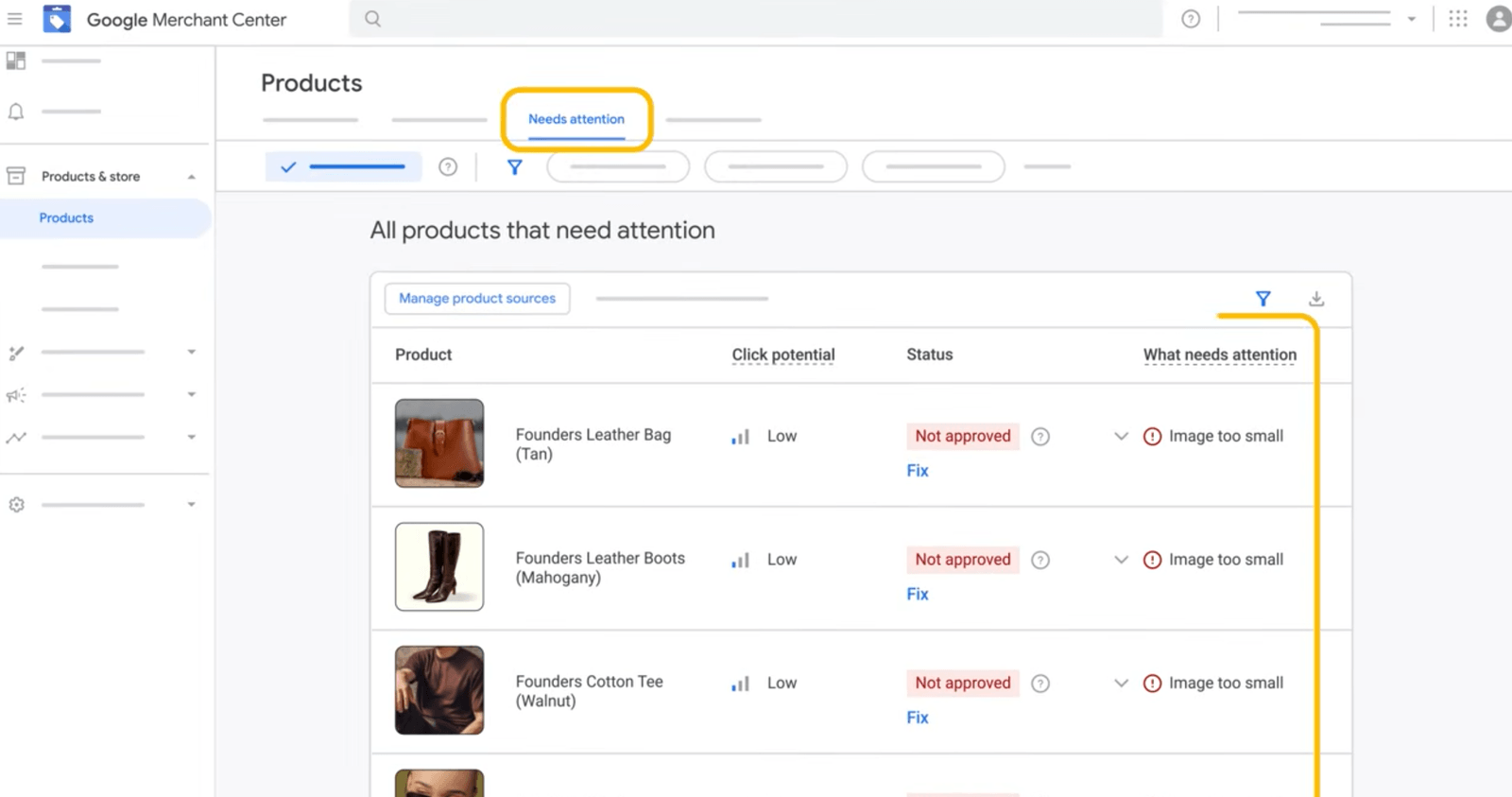
Look for the warning Image too small for upcoming enforcement.
Select View fix, then download the impacted products list.
Google also provides image filters and bulk download options under Needs attention.
Step 2. Prioritize products instead of checking every image file.
Do not start by opening every image in Shopify's Media library.
Use Google's downloaded report to identify affected products. Check their primary images first, then review the additional images associated with those products.
If you cannot access Merchant Center, Shopify product data can help you inspect image dimensions, although you will need to verify the actual image URLs and their metadata.
Step 3. Divide affected products into three groups.
- Original high-resolution file available: Replace the undersized image with the original.
- Original file unavailable: Request a better image from the supplier or arrange a new product shoot.
- Product no longer commercially important on Google: Consider removing it from the channel rather than spending resources rebuilding its image set.
This turns a large image cleanup into a manageable product-prioritization exercise.
Step 4. Replace images and verify the results.
Upload compliant images through Shopify's product Media section or your connected product feed. Make sure the primary image is correct and check the additional images as well.
For better performance across Google's listing formats, Google recommends images around 1,500×1,500 pixels or larger, although 500×500 pixels is the minimum requirement.
Allow time for Google to process the changes. According to Google's image status guidance, an unchanged image URL can take up to six weeks to be recrawled. Renaming the image file and submitting a new URL can prompt a recrawl within 24–72 hours.
After updating the images, allow time for the changes to appear in Merchant Center and check the status again.
Source: Google: How to check and manage product image status.
Count products, not just images
The January 31 deadline is approaching, but the most useful first step is not a full-scale cleanup of the Shopify media library.
Start with Google's affected-product report. Identify the products that still matter to your Google sales channel, check their primary images and locate the original high-resolution files.
Then work through the additional images.
This week's task: Download the Merchant Center warning report and identify which affected products still have usable high-resolution source images.
Sources and further reading
- Google Merchant Center: Image too small | Official requirements and remediation steps.
- Google Merchant Center: Primary image link | Primary image requirements.
- Google Merchant Center: Additional image link | Additional image requirements and the distinction between image visibility and product disapproval.
- Google Merchant Center: Product data specification update | Announcement of the January 31, 2027 enforcement date and automatic image optimization.
- Google Merchant Center: Image status and processing | Image crawling and processing timelines.
- Shopify Help Center: Google & YouTube channel requirements | How the image requirement applies to Shopify stores.
- Search Engine Roundtable, August 24, 2026 | Coverage of Google's announcement.
Ask AI next
- How can I replace product images in bulk across many Shopify products instead of editing one product at a time?
- Which Shopify apps or exports list every product image with its pixel width and height in one spreadsheet?
- Does Shopify's Google & YouTube channel send each variant's own image as the primary image for that variant?
- How do I give a replaced Shopify product image a new file name and URL so Google Merchant Center recrawls it sooner?
- How can I tell in Merchant Center whether Google has automatically optimized one of my undersized product images?